Unity Entities Tutorial
Unity Entities 1.0.0 Tutorial - Step 2. Turret Rotation
종잇장
2023. 1. 28. 12:37
관리되지 않는 시스템(ISystem), 쿼리, 관용적 foreach의 개념을 소개합니다.
- "Scripts/Systems" 폴더에 "TurretRotationSystem.cs"라는 새 파일을 만들고 거기에 아래 코드를 작성합니다.
using Unity.Burst;
using Unity.Entities;
using Unity.Mathematics;
using Unity.Transforms;

// ISystem을 기반으로 하는 관리되지 않는 시스템은 BurstCompile 할 수 있지만 아직 기본값은 아닙니다.
// 따라서 [BurstCompile] Attribute를 사용하여 명시적으로 BurstCompile을 선택해야 합니다.
// 구조체와 OnCreate/OnDestroy/OnUpdate 함수 모두에 추가되어야 합니다.
// 효과적입니다.
[BurstCompile]
partial struct TurretRotationSystem : ISystem
{
    // ISystem에서 정의한 모든 함수는 비어 있어도 구현해야 합니다. (interface에 abstract 함수라 무조건 선언해야합니다.)
    [BurstCompile]
    public void OnCreate(ref SystemState state)
    {
    }

    // ISystem에서 정의한 모든 함수는 비어 있어도 구현해야 합니다. (interface에 abstract 함수라 무조건 선언해야합니다.)
    [BurstCompile]
    public void OnDestroy(ref SystemState state)
    {
    }

    [BurstCompile]
    public void OnUpdate(ref SystemState state)
    {
        // 2초 동안 Y축 기준으로 360도 회전.
        var rotation = quaternion.RotateY(SystemAPI.Time.DeltaTime * math.PI);

        // 고전적인 C# foreach는 우리가 종종 "관용적 foreach"(IFE)라고 부르는 것입니다.
        // Aspect는 Component 데이터에 직접 액세스하는 것보다 더 높은 수준의 인터페이스를 제공합니다.
        // Aspect와 함께 IFE를 사용하는 것은 기본 스레드 코드를 작성하는 강력하고 표현적인 방법입니다.
        foreach (var transform in SystemAPI.Query<TransformAspect>())
        {
            transform.RotateWorld(rotation);
        }
    }
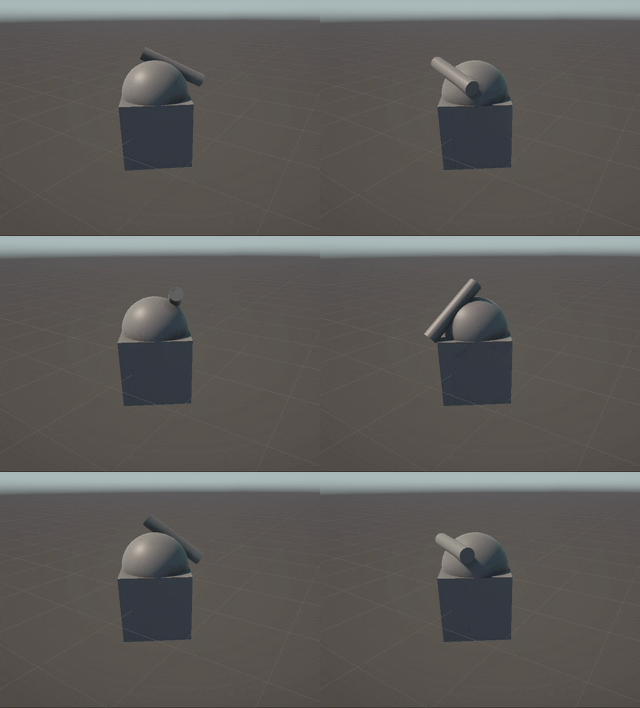
}- 플레이 모드로 들어가 모든 것이 재미난 방식으로 회전하고 있음을 확인합니다(대포가 나머지 대포에서 점진적으로 분리되고, 아래 애니메이션은 약간 실행한 후의 상황을 보여줍니다).
Note:
문제는 우리가 만든 foreach가 변형이 있는 모든 것과 일치한다는 것입니다. 이로 인해 탱크 계층 구조의 모든 부분이 회전하게 됩니다. 포탑의 회전에만 영향을 미치도록 제한해야 합니다.
- 플레이 모드를 종료합니다.
- "Scripts/Authoring" 폴더에 "TurretAuthoring.cs"라는 새 파일을 만들고 아래 코드를 작성합니다.
using Unity.Entities;

// MonoBehaviour 제작은 일반 GameObject Component입니다.
// ECS 데이터를 생성하는 Baking 시스템의 입력을 구성합니다.
class TurretAuthoring : UnityEngine.MonoBehaviour
{
    // Bakers convert authoring MonoBehaviours into entities and components.
    // (Nesting a baker in its associated Authoring component is not necessary but is a common convention.)
    class TurretBaker : Baker<TurretAuthoring>
    {
        public override void Bake(TurretAuthoring authoring)
        {
            AddComponent<Turret>();
        }
    }
}

// ECS Component입니다.
// 빈 Component를 "Tag Component"라고 합니다.
struct Turret : IComponentData
{
}- TurretAuthoring.cs 파일을 Turret GameObject로 드래그 앤 드롭하거나 GameObject Inspector에서 "Add Component" 버튼을 사용하고 "Turret Authoring"을 찾아 "TurretAuthoring" Component를 "Turret" GameObject에 추가합니다.
- "Turret" GameObject가 선택된 상태에서 "Entity Conversion" 패널(위로 드래그하여 확장해야 할 수 있음)에서 이제 "Turret" Component가 엔티티에 있는지 확인합니다.

null - "Scripts/Systems" 폴더에 있는 "TurretRotationSystem.cs" 파일의 내용을 다음과 같이 수정합니다.
 using Unity.Burst;
 using Unity.Entities;
 using Unity.Mathematics;
 using Unity.Transforms;

 [BurstCompile]
 partial struct TurretRotationSystem : ISystem
 {
     [BurstCompile]
     public void OnCreate(ref SystemState state)
     {
     }

     [BurstCompile]
     public void OnDestroy(ref SystemState state)
     {
     }

     [BurstCompile]
     public void OnUpdate(ref SystemState state)
     {
         var rotation = quaternion.RotateY(SystemAPI.Time.DeltaTime * math.PI);

+        // WithAll은 쿼리에 제약 조건을 추가하여 모든 엔터티에 해당 Component가 있어야 함을 지정합니다.
+        foreach (var transform in SystemAPI.Query<TransformAspect>().WithAll<Turret>())
-        foreach (var transform in SystemAPI.Query<TransformAspect>())
         {
             transform.RotateWorld(rotation);
         }
     }
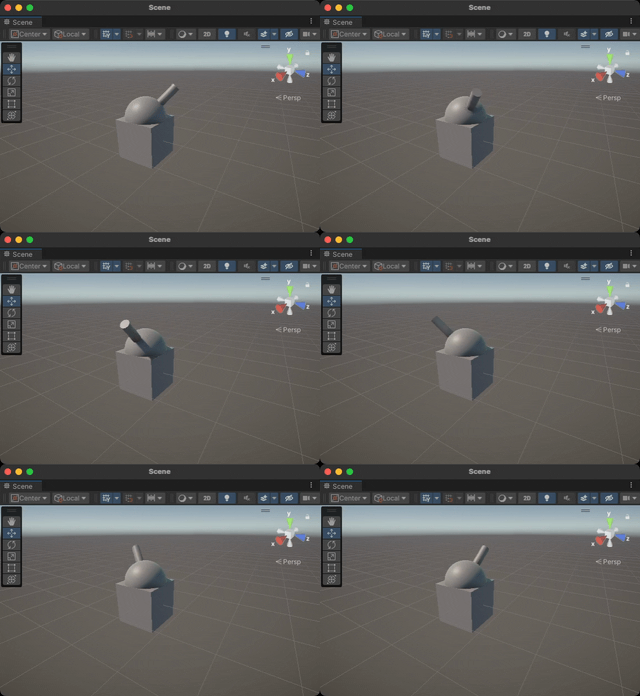
}- 플레이 모드로 들어가 이제 포탑만 회전하는지 확인합니다.
null - 플레이 모드를 종료합니다.